口座間資金移動はできますか?
はい、Tradeviewで複数の口座をお持ちの場合、口座間の資金移動はとても簡単です。
ステップごとの手順については資金移動方法をご覧ください。
資金移動方法
画面左側の「資金移動」をクリック
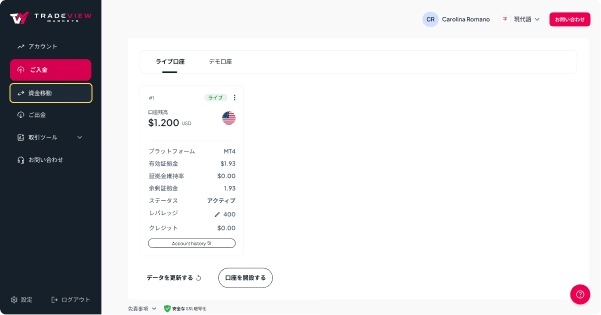
資金を移動する送金元の口座を選択
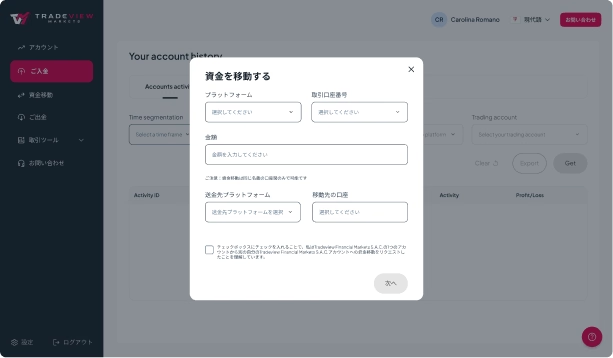
通貨を選択
金額を入力
資金を受け取る送金先の口座を選択
はい、Tradeviewで複数の口座をお持ちの場合、口座間の資金移動はとても簡単です。
ステップごとの手順については資金移動方法をご覧ください。
資金移動方法
画面左側の「資金移動」をクリック
資金を移動する送金元の口座を選択
通貨を選択
金額を入力
資金を受け取る送金先の口座を選択
Copyright © 2026. All rights reserved.
There is a risk of loss in trading foreign currencies and it is not suitable for everyone. Tradeview is not responsible for any gains or losses on currency rates or exchanges during any transaction.
The services and products offered by Tradeview Markets are not being offered within the United States (US) and not being offered to US Persons, as defined under US law. The information on this website is not directed to residents of any country where FX and/or CFDs trading is restricted or prohibited by local laws or regulations.
CFDs are complex instruments and come with a high risk of losing money rapidly due to leverage. 64% of retail investors' accounts lose money when trading CFDs with Tradeview. You should consider whether you understand how CFDs work and whether you can afford to take the high risk of losing your money.
Headquarters Tradeview Financial Markets S.A.C: Calle Los Alcanfores No. 495 Int. 505 Urb. Leuro Lima. Lima, Miraflores.
Headquarters Tradeview Ltd.: 13 Genesis Close, 4th Floor, Suite 422, Cayman Islands
High Risk Warning: Foreign exchange trading carries a high level of risk that may not be suitable for all investors. Leverage creates additional risk and loss exposure. Before you decide to trade foreign exchange, carefully consider your investment objectives, experience level, and risk tolerance. You could lose some or all your initial investment; do not invest money that you cannot afford to lose. Educate yourself on the risks associated with foreign exchange trading and seek advice from an independent financial or tax advisor if you have any questions.
Advisory Warning: Tradeview provides references and links to selected blogs and other sources of economic and market information as an educational service to its clients and prospects and does not endorse the opinions or recommendations of the blogs or other sources of information. Clients and prospects are advised to carefully consider the opinions and analysis offered in the blogs or other information sources in the context of the client or prospect's individual analysis and decision making. None of the blogs or other sources of information is to be considered as constituting a track record. Past performance is no guarantee of future results and Tradeview specifically advises clients and prospects to carefully review all claims and representations made by advisors, bloggers, money managers and system vendors before investing any funds or opening an account with any Forex dealer. Any news, opinions, research, data, or other information contained within this website is provided as general market commentary and does not constitute investment or trading advice. Tradeview expressly disclaims any liability for any lost principal or profits without limitation which may arise directly or indirectly from the use of or reliance on such information. As with all such advisory services, past results are never a guarantee of future results.


